Motion Store

GuideFlow
Coming soon
CAPTIONFLOW FOR PREMIERE PRO ON MAC
Captions that
move with your edit.
Generate Hindi, Hinglish and regional-language captions, style them, and place them on your Premiere timeline.
THE WORKFLOW
From audio to animated captions.
Choose your audio
Open CaptionFlow in Premiere Pro, select the audio and choose the spoken language.
Generate and style
Generate timed captions and choose a built-in animated style for your edit.
Put it on the timeline
Add the styled captions to your sequence and preview them alongside your cut.
How to use CaptionFlow
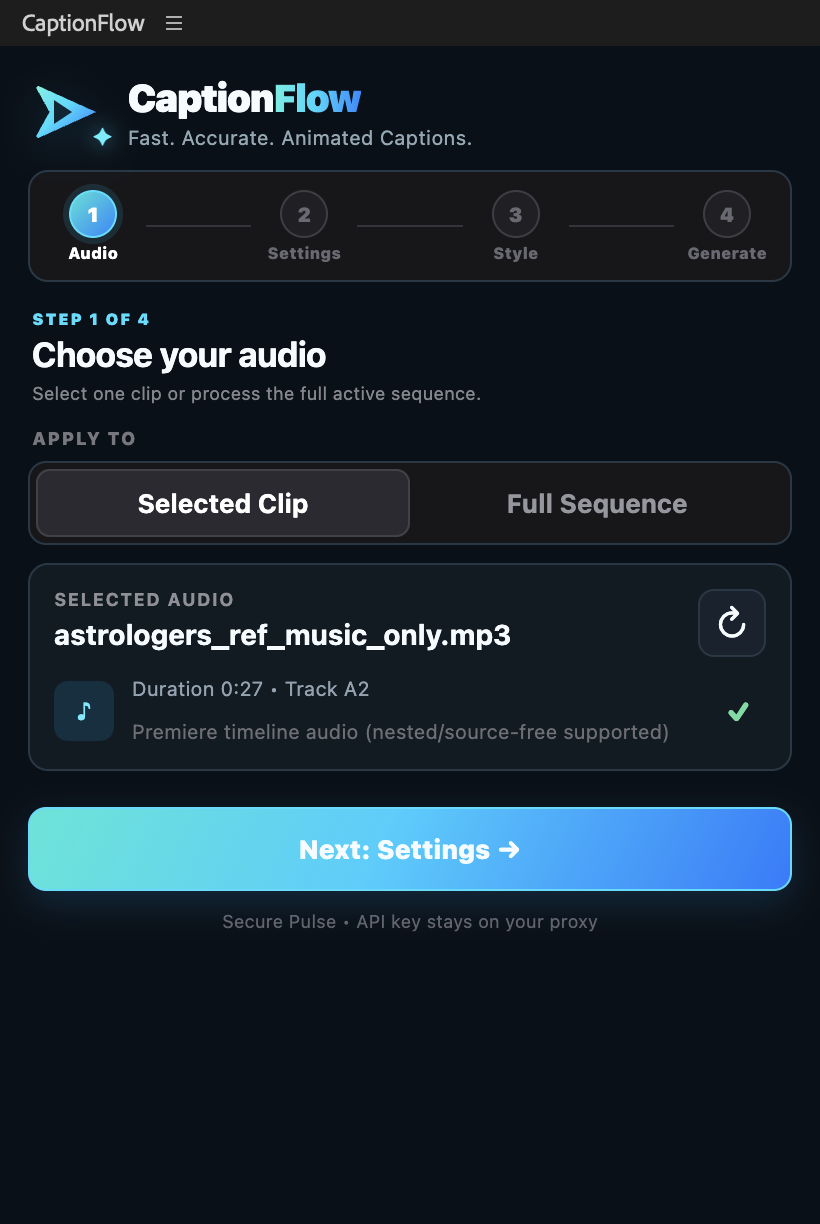
Choose your audio
Select an audio clip in your Premiere timeline, then choose Selected Clip or Full Sequence in CaptionFlow. If needed, click refresh and continue to Settings.
CaptionFlow pricing
- Starter
- ₹99
₹149 - Plugin + 30 min
- Top-up
- ₹169
₹249 - 60 min
Buy nowPayments open at launch.
FAQ
CaptionFlow help
How do I install CaptionFlow?
Close Premiere Pro, unzip the Mac download, and run install-macos.command. Reopen Premiere Pro and choose Window → Extensions → CaptionFlow.
Where do I enter my access code?
Open Settings in CaptionFlow, paste your Plugin Access Code, and click Test Proxy to check the connection.
How are my minutes used?
A 30-second clip uses 30 seconds of balance. Transcribing it again uses another 30 seconds. When you need more time, top up with the same access code.